Showing posts with label technology. Show all posts

Sunday, 26 June 2016

Podcasting - An Amateur Guide

Over the years I have been lucky enough to contribute to and host a variety of podcasts. My first forays were as a guest on The Dice Tower and On Board Games, where I recorded short and usually relatively surreal segments over the course of maybe 40 or 50 episodes (between them). Later I hosted a short ten episode series called Teaching Strategies I recorded with Tom Vasel (of Dice Tower fame). This led to Donald Dennis (of On Board Games) and I to kick off Games in Schools and Libraries (still going strong with Don and Stephanie), and then the Element 270 podcast - all about Spartan Games, with Peter Fontebasso and Reese Plank. Recently I've also appeared on the Inverse Genius podcast, talking about various Netflix series.

Podcasting is a time consuming hobby, but it's also a highly enjoyable one. I love listening to a range of podcasts on a variety of topics from history, to science, technology and, of course, games.

One of the questions I have been asked quite a lot is 'how do I start a podcast?' This is a question I am going to try and briefly cover in this post.

Planning:


Podcasts require planning, you need to have an idea of what you want to cover and how you want to cover it, as well of course as a solid grasp of your intended audience. 
You also want to have some solid plans about how you're going to structure your podcast. Some podcasts are free-flowing discussions, some tightly scripted and with a variety of specific segments. You need to pick a style and structure that works for you, both one that you like, one you think your audience will appreciate, and one that you can manage. The more pieces that need to be fitted together, the more time it will take, but variation can also make a podcast easier to listen to and more engaging for the listener.

Recording:


If you are recording on your own then it's between you and your microphone. If you have co-hosts or guests, then you need to work out how to get their audio as well. If your co-hosts are in the same room, then it's just a matter of getting together and hitting record (oh, and making sure your microphone settings can pick everyone up). If your co-hosts (like all of mine) live elsewhere in the country or world, then you need to manage two vital things: scheduling, and recording.

I use Skype when recording with my co-hosts, I've also known people who use Google Hangouts with great success, but I have never tried it. Scheduling can be a big issue, most of the people I have worked with over the years live in different time-zones, and working out a consistent time to get together and record is important.

As for actually recording the audio... there are several ways to do this, some programs exist that will record a Skype call, and some of them even split each persons voice (or call) into separate tracks. Splitting audio into individual tracks very useful when it comes to editing, if one person has a heater running in the room, a persistent cough, or a cat jumping around next to the microphone, then it's easier to remove those noises when dealing with that single person's audio track rather than a single track that includes everyone. 

When I'm recording on my Mac, I have tended to use Call Recorder - this costs money initially, but works well. The only issue is that every call aside from my own is mixed into a single track. Similar programs exist for Windows.

Another common option with regular co-hosts or guests is to have everyone record their own audio files, the various files can then be sent to the person whose job it is to put everything together. This is a great way of maintaining quality - as long as everyone is using the same settings. It also makes it easy to manage everyone's tracks. However, it is the most work.

It might sound obvious, but when you're recording you want a nice quiet environment. Cars and heaters, fans, children and cats, these are all enemies of the podcaster. Pick somewhere nice a quiet. You can make your own little recording booth using acoustic noise removal foam and whatnot, I never got that deep, but it is certainly an option.

Get a reasonable microphone. I use a Yeti Blue microphone, and I think it's great. There are lots of good microphones out there - get a reasonable one, don't use the microphone on your laptop. Headset Microphones work ok, but a desk mic is better in my opinion. Don't sit the microphone next to or behind your computer, as it can pick up the noise of the fans, and make sure the microphone is set to record the space you are in, and no-where else (eg: if it's just you and your micrphone - cardioid mode will pick what's in front of the mic, but not the sides or behind - perfect for one).

You will also want some headphones. You can expensive noise-cancelling headphones from lots of places, I just use the earbuds I got with my phone and they have worked fine.

The candles are optional... but add a certain atmosphere.

Audacity:


There are lots of different recording programs you can choose from, Garage Band is a popular one, I tend to use Audacity. Is Audacity the best? I don't know, it's the one I am familiar with and has worked well for me in the past. Audacity has some little quirks, like the fact it won't pick up your microphone unless it's plugged in before the program is opened, but it is excellent.

Make sure you head to 'Edit' and 'Preferences' to select your microphone, obvious? I did say this was an amateur's guide.

This is Audacity.

Once you have everything set up it's as simple as hitting record and recording...

Save often.

Mmm, some nice audio there.


Of course, after you record you need to edit, to edit I usually zoom the audio so the time track is in seconds, this seems to be the easiest for me to work with.

Save.


Select a piece you want deleted and hit backspace - gone! Ahh, the magic of technology. 

Editing is a pain in the neck. I despise editing with the passion of a thousand newly formed stars. Editing is, however, required. Go back through your and everyone else's audio tracks and remove or silence the excessive umms and ahhs, the long pauses, the mistakes, the pops and coughs, the time Daryl took a sip from his bottle of beer and the sniffling of Emily due to her cold. Save. If you are working with several audio tracks you need to make sure you keep everything nicely synced up as you do it. Cut 3 seconds from one track, the others need to be adjusted to accommodate this. Save.


Sometimes an audio track has a persistent background noise, an incessant buzzing noise that makes you want to bite things. Noise Removal is your friend, but be careful, it can be a fickle friend. The first thing to do with noise removal is to select a piece of the audio track that represents the background noise, and the background noise only. Do not, I repeat, do not select a piece of audio where someone is speaking. Dreadful things happens to those that do. After you have done this, go to 'Noise Removal' under 'Effects' and click 'Get Sample'.


Once the sample has been taken, get out of Noise Removal and select the entire audio track (or part affected by the buzzing noise that is clawing at your senses). Go back into Noise Removal and click 'Ok' at the bottom. You can mess with the settings, but that is for advanced people unlike myself.

Save.


Oh yes - use the Time Shift tool to slide an audio track left or right to line it up.

Save.

Leveling:


Once you have experienced the blood chilling, mind-numbing drudgery that is the editing process, and all is well with your podcast so far (save), you need to add in bumpers (if any), ads (if any), music (if any) and the intro and outro.

If the audio track was all recorded through the same microphone - ie: it was you, or you and some friends, then you probably don't need to level it. If, however, the audio is several people via Skype, or one person was particularly shy, or a microphone somewhere was turned down, then you should level the audio. Leveling is basically evening out the sound, making the quiet bits louder and the loud bits quieter so the gentle listener doesn't turn the podcast up when soft-spoken-Sven is on only to have his ear-drums perforated when Loud-Laughing-Larry starts to guffaw. 

I use a program called Levelator, which I think is no longer supported. But there are plenty of options out there that you can find with some google-fu.
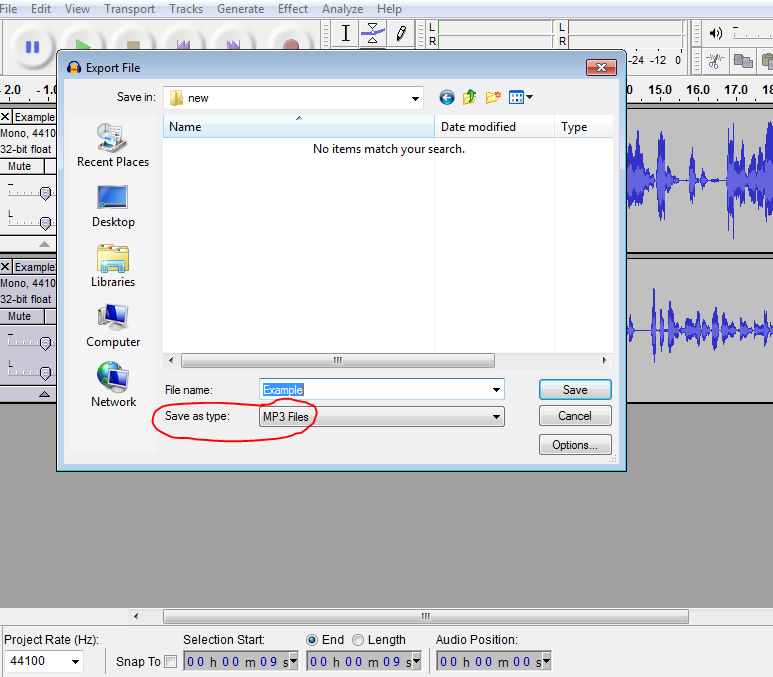

If you planning to level the audio, do so before you add in any music. To level with the Levelator you need to export your edited track/s as a .wav file. Once done you can drag and drop the file onto the Levelator, which will do its thing and leave you with a second track with the added '.output' to the file name. 


Import the .output file back into Audacity, and now add any music and whatnot as required.


Again - use the Time Shift to make everything line up nicely. Once that is done, export the file as an .mp3, add any tags you feel are required (I always use the tags, as it's an easy way to track episodes on my player).

You have a prospective podcast episode!


Hosting:


Now to upload it to your host, where it will be listened by your million adoring fans.

Ah yes, hosting. A podcast host is a web service that hosts your audio files. There are lots to choose from, Soundcloud, Podomatic, Podbean... Generally they will all cost money, and in return provide you with a hosting service and RSS feed, and usually an upload limit of some sort. I used Libsyn with the Element 270 podcast, and it worked fine. For $15USD per month I had an upload limit of 250MB per month. Seems enough, but generally every minute of your show = 1MB, if you do two to three long episodes in a month, you can easily hit that limit. Pick a host that fits your budget and your intended schedule.

Once you have your host you have an RSS feed which you can plug into iTunes or any other reputable podcatcher! Well done!

Phew. If you have managed to read to the end of that congratulations, you deserve some sort of medal or award. However, having spent all my hard-earned money on microphones and hosting services, you are going to have to use your imagination.

In any case - that is the quick and dirty amateur's guide to doing a podcast thingy, I hope it is helpful to someone!


Thursday, 3 September 2015

Organisation...

The promise of being able to capture the thousand fractures of light and colour that make up the kaleidoscope of ideas that traverse my mind is appealing. The alternative: saying dishonestly to myself, "I'll remember that tomorrow morning," always results in the same sad and frustrated fate come that morning, when the only thought rebounding in my head is, "There used to be a better one here not so long ago."

I have a bunch of note books that are badly organised and generally filled with a mix of various projects, drawings, notes and things the children did (which can hold multiple meanings). All of which, of course, makes them less than useful. I've always found the idea of being well organised in the note book sense rather engaging, being able to jot down ideas for blog posts, podcast topics, game ideas, setting concepts and flashes of story seems the sort of thing I should be doing, after all, I keep telling myself I should, but it's something I've never really mastered.

I have tried a great many organisational apps over the years, from Awesome Note, to Evernote, to Something Note to The Other One Note to Umm Note. Every time they take me on a sort of short lived mildly euphoric roller-coaster (well, more like an energetic miniature-train ride). That sense that 'this is one'! THIS is the methodology that will help me herd and pen all those cats I call ideas. I haven't found one yet that managed to live beyond that initial mentally salubrious beginning. I write all this nonsense because I spent that last twenty minutes reinstalling Evernote on everything I own that can be plugged in and has a screen. I am hoping that my foray once again into the realm of attempting to organize the mess I usually call my mind will be more successful than the last. We shall see.

Saturday, 12 January 2013

Science and Technology Podcasts


Science and Technology Podcasts:


The last of the three broad categories which fill up my podcast queue is science and technology.  This is really a rather loose descriptor, but will have to suffice for the sake of this post.

When I use the term ‘science’, readers might find that rather than covering a range of different scientific topics, most of the podcasts relate to astronomy, and that technology is relegated to a single show.  These are just the podcasts that I currently subscribe to, there are, of course, a great many more, and if there are any stand out exceptions, I’d love to read about them!


All in the Mind


All in the mind is a podcast covering a rather eclectic mix of topics to do with psychology and neuroscience.  The show is well presented, and each episode deals with a specific topic, such as shared memory, or the science of compassion.  All in the Mind is an enjoyable and interesting listen.

Dr Karl’s Great Moments in Science


A very brief podcast, with each episode featuring Dr Karl discussing some tidbit, whether from current scientific research or an important breakthrough or discovery in the history of science.  It’s an extremely quick glance at each topic, but rather engaging nonetheless.

The Infinite Monkey Cage


The two hosts, Robin Ince and Brian Cox are usually joined by a panel of 3 others to discuss a topic.  The show manages to encapsulate a lively, interesting and humourous discussion within a relatively short time-frame.  The Infinite Monkey Cage is recorded in series, and episodes are highly enjoyable.  This is probably one of my favourite podcasts, not just of this category, but of all the podcasts I listen to.  It manages to maintain both a humourous approach to discussion, as well as covering some fascinating areas for discussion.  Brian and Robin work well together to provide a witty and intelligent banter, and their guests are a mix of experts and comedians/non-experts, and the mix works very well.

A thoroughly excellent show; not for those who avidly follow their star sign, or suspect their might be fairies at the bottom of their garden, but a wonderful podcast.

Planetary Radio


A podcast hosted by Matt Caplan of the Planetary Society.  Planetary Radio discusses the news and goings on in the world of space exploration, with a variety of segments from other members of the Planetary Society.  It’s an interesting, and each episode is a light and enjoyable listen.

StarStuff with Stuart Gary


Probably my favourite podcast that relates to astronomy, and I’ve listened to a few.  Stuart manages to cover the news of what’s going on in space exploration and astronomy mixing a good deal of information into a digestible and enjoyable package.  All in all it’s a fantastic show for those with an interest in the world of space exploration or the scientific discoveries that relate to our universe.  Well recommended.

StarTalk Radio Show


StarTalk Radio is the question time section of the StarTalk radio show with Neil deGrasse Tyson.  This show is both about the information it presents, and the personality of it’s main host - Neil deGrasse Tyson.  Neil manages to cover his topics extremely well, with a good dose of humour and flair.  Highly enjoyable.

This Week in Tech


This Week in Tech, with Leo LaPorte and a variety of guest panelists, is a podcast covering all the news of the tech world, from start ups to the big companies.  The discussion is lively and enjoyable.  The mixture of expert panelists makes for some interesting discussion, insights and analysis of the goings-on in the world of technology.  It’s a longer show, but nonetheless, very enjoyable to listen to.


____
So these are the main podcasts I listen to that fit beneath the banner of science and technology, they are certainly not the only podcasts, or even the best, but they are the ones I subscribe to at the moment.

One of the topics I’d love to find a podcast covering is the world of paleontology, search as I might I can’t seem to find anything that covers this area.  If anyone knows of such a show - I’d love to hear about it!

Cheers,
Giles.

Saturday, 3 March 2012

Our evolving classroom

It’s been an interesting week or so since my last post.  My day-time job is as a teacher, and in the lead-up to the annual roll out of netbooks for the students in my class (it takes time to image them all and what not, and thankfully we have a talented technician who handles this - as every school should) I’ve been busy trying to set up a class blog site, a twitter account and the protocols around how these things will be used.

I like using technology in my classroom - it allows for a greater emphasis on individualised learning - at least that’s why I like it.  Each student can plug into a topic or task at their own level, and they have the resources required to research different things and to different depths as their tasks and abilities require.  It also provides them with the means to express and record their learning in different ways.

I’ve been wanting to start a class blog site for a little while now - I’ve made use of the department of education provided ‘sand-box’ for secure online experimentation (called the Ultranet), and I’ve also had the kids record and cut together a class podcast for the last 5 years or so.  Wanting to add more things ‘to do’ to that list has always been tempered by the idea that I want to make the use of these things useful; not just playing for the sake of it.

Well, our new blog site and twitter feed are all about home-school communication, about building a level of contact between families and the students classroom experiences.  I’ve been impressed with how interested the students have been so far, and I’m quietly excited about the potentials these things bring.

Our blog site represents a weekly new bulletin of what’s been happening in class.  It provides a place for students to make comments (moderated), and a place where I can post links to interesting sites, freeware and other bits and pieces.

Our twitter feed is about being more immediate, I hope we’ll use it to keep those families and followers up-to-date on what’s happening in the classroom - all in 140 characters or less.  My grand hope is that our twitter feed will also allow a more immediate level of interaction between our followers and our class.  The use of hash-tags to filter responses to particular questions will hopefully be something we can explore.

Of course we’re still doing our podcast - our first episode is nearly recorded and ready to cut together.  We’re still using the Ultranet.  But each of these things is now being utilised in a more specific way to address more specific needs.  Our goal in using technology is not an end in itself - it is a tool, albeit a powerful one - that supports and extends the opportunities provided to the students in the class.  It is used to support learning across a wide range of subjects and for a wide range of purposes.  It can be used to support numeracy, literacy, science or whatever, but there are also important lessons that need be learned, for the digital and ‘real’ worlds are not as distinct from one another as they once may have been.

Technology is a fantastic resource for every classroom - it empowers individuals to gather information and produce varied responses to it.  It is a vehicle that allows students an opportunity to express themselves in different and personal ways.  It also provides a medium through which dialogue between individuals and groups can take place; it moves the classroom into the world at large, and the world at large into the classroom.


Giles Pritchard.